Import Guide
How to import existing schemas and data contracts into Open Data Modelling
Import Guide
The import functionality allows you to bring existing schemas and data contracts into Open Data Modelling from various formats. This guide covers the import process, supported formats, and best practices.
Supported Formats
Open Data Modelling supports importing from:
- JSON Schema: Standard JSON Schema format
- Avro: Apache Avro schema files
- Protobuf: Protocol Buffer schema definitions
- OpenAPI/Swagger: API schema definitions
- CSV: Columnar data with header inference
- ODCS: Open Data Contract Standard format
Import Process
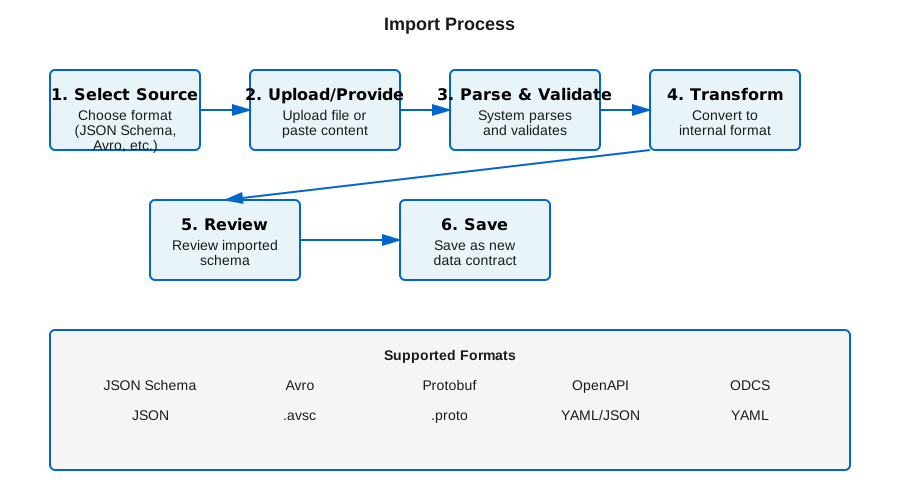
The import process follows these steps:
- Select Source: Choose the format and source of your schema
- Upload/Provide: Upload a file or provide schema content
- Parse & Validate: System parses and validates the schema
- Transform: Convert to internal format if needed
- Review: Review the imported schema
- Save: Save as a new data contract
Step-by-Step Instructions
Using the Web App
- Navigate to the Contracts section
- Click Import button
- Select the format from the dropdown
- Upload your schema file or paste the content
- Review the parsed schema
- Click Import to create the contract
Using the SDK
import { SchemaImporter } from "@opendatamodelling/sdk";

const importer = new SchemaImporter();

// Import from JSON Schema
const contract = await importer.import({
  format: "json-schema",
  source: jsonSchemaContent,
  name: "my-contract",
  version: "1.0.0",
});

// Import from file
const contractFromFile = await importer.importFromFile({
  format: "avro",
  filePath: "./schema.avsc",
});
Using the CLI
# Import via CLI
data-modelling-cli import --format json-schema --input schema.json --output odcs
Format-Specific Notes
JSON Schema
- Supports all JSON Schema draft versions (4, 6, 7, 2020-12)
- Nested objects and arrays are fully supported
- Custom validation rules are preserved
Avro
- Schema evolution is supported
- Complex types (unions, maps, arrays) are converted appropriately
- Namespace information is preserved
Protobuf
- Message definitions are converted to object schemas
- Field types are mapped to standard types
- Enum types are preserved
Best Practices
Before Importing
- Validate First: Ensure your source schema is valid
- Check Format: Verify the format matches what you’re importing
- Review Structure: Understand the schema structure before importing
- Version Control: Consider versioning your imported schemas
After Importing
- Review Carefully: Check that all fields were imported correctly
- Add Metadata: Add descriptions and documentation
- Set Permissions: Configure access controls if needed
- Test Validation: Test with sample data to ensure it works
Troubleshooting
Common Issues
Schema Parse Errors
- Verify the schema format matches the selected import type
- Check for syntax errors in the source file
- Ensure the schema follows the format specification
Missing Fields
- Some formats may not support all features
- Check the format compatibility guide
- Consider manual adjustments after import
Validation Failures
- Review the error messages carefully
- Check for required fields that may be missing
- Verify data types match expectations
Related Resources
- Export Guide - Learn how to export contracts
- ODCS Documentation - Standard format documentation
- Data Contracts - Understanding data contracts