Web App
Modern web-based application for creating and managing data contracts from any browser
Web App
The Open Data Modelling Web App is a modern, responsive web application that allows you to create and manage data contracts from any device with a web browser. No installation required - just open your browser and start working.
Features
Browser-Based Interface
- Responsive design for desktop, tablet, and mobile
- Works in all modern browsers
- No installation or updates required
- Cross-platform compatibility
Contract Management
- Create and edit data contracts online
- Cloud storage and synchronization
- Version control and history
- Collaboration features
Visual Tools
- Drag-and-drop schema builder
- Real-time validation
- Visual data flow diagrams
- Export to multiple formats
Accessibility
- Keyboard navigation support
- Screen reader compatible
- High contrast mode
- WCAG 2.1 Level AA compliant
Getting Started
Access the Web App
Simply navigate to the web app URL in your browser. No account required for basic features, sign up for cloud storage and collaboration.
Quick Start
- Open the App: Navigate to the web app URL
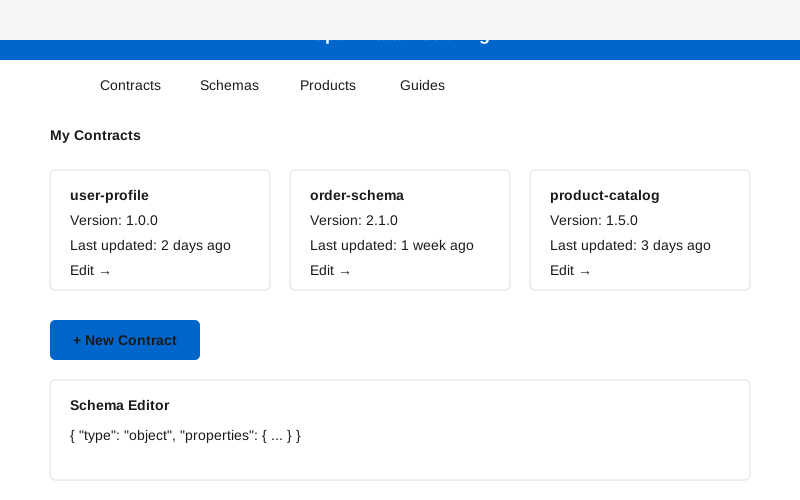
- Create a Contract: Click “New Contract” to begin
- Design Your Schema: Use the visual editor
- Test Validation: Try validating sample data
- Save & Share: Save your work and share with your team
Screenshot
Documentation
Current Version: v1.1.0
For detailed documentation, user guides, and release notes, visit the frontend repository:
- Frontend v1.1.0 README - Release documentation
- Frontend v1.1.0 CHANGELOG - What’s new in v1.1.0
Browser Support
- Chrome 90+ (recommended)
- Firefox 88+
- Safari 14+
- Edge 90+
Use Cases
- Remote Teams: Access from anywhere, no installation needed
- Quick Prototyping: Fast contract creation and testing
- Collaboration: Share contracts with team members
- Cross-Platform: Works on Windows, macOS, Linux, and mobile
Related Tools
- Data Modelling SDK - Programmatic access
- Data Modelling CLI - Command-line format conversion tool
- OSX App - Native macOS alternative
Support
For issues, feature requests, or contributions, please visit the GitHub repository.